


Securaze Command 6
The on-premise station that runs your processing floor.
- PXE-boot entire benches — no USB sticks
- Central license and settings management on your network
- Designed for air-gapped and high-security facilities
- Scales to ~500 concurrent PXE clients per site
Certified & independently verified



Platforms
- On-premise server
- PXE network boot
- Offline-capable
When you process thousands of devices, USB sticks are a bottleneck. Command turns the network itself into your boot medium.
Everything Securaze Command 6 does for you
PXE network boot
Boot processing clients straight from the network — up to ~500 concurrent clients, no per-device USB preparation, instant version updates for the whole floor.
Central configuration
Network, licenses, erasure policies and station settings managed in one place — consistent processing on every bench.
Deployment automation
Documented deployment and installation flows get a new site productive in hours, not weeks.
Offline & air-gapped operation
Command runs on your premises and keeps working without internet — reports from offline runs are kept on Command and can be exported.
Every machine, live
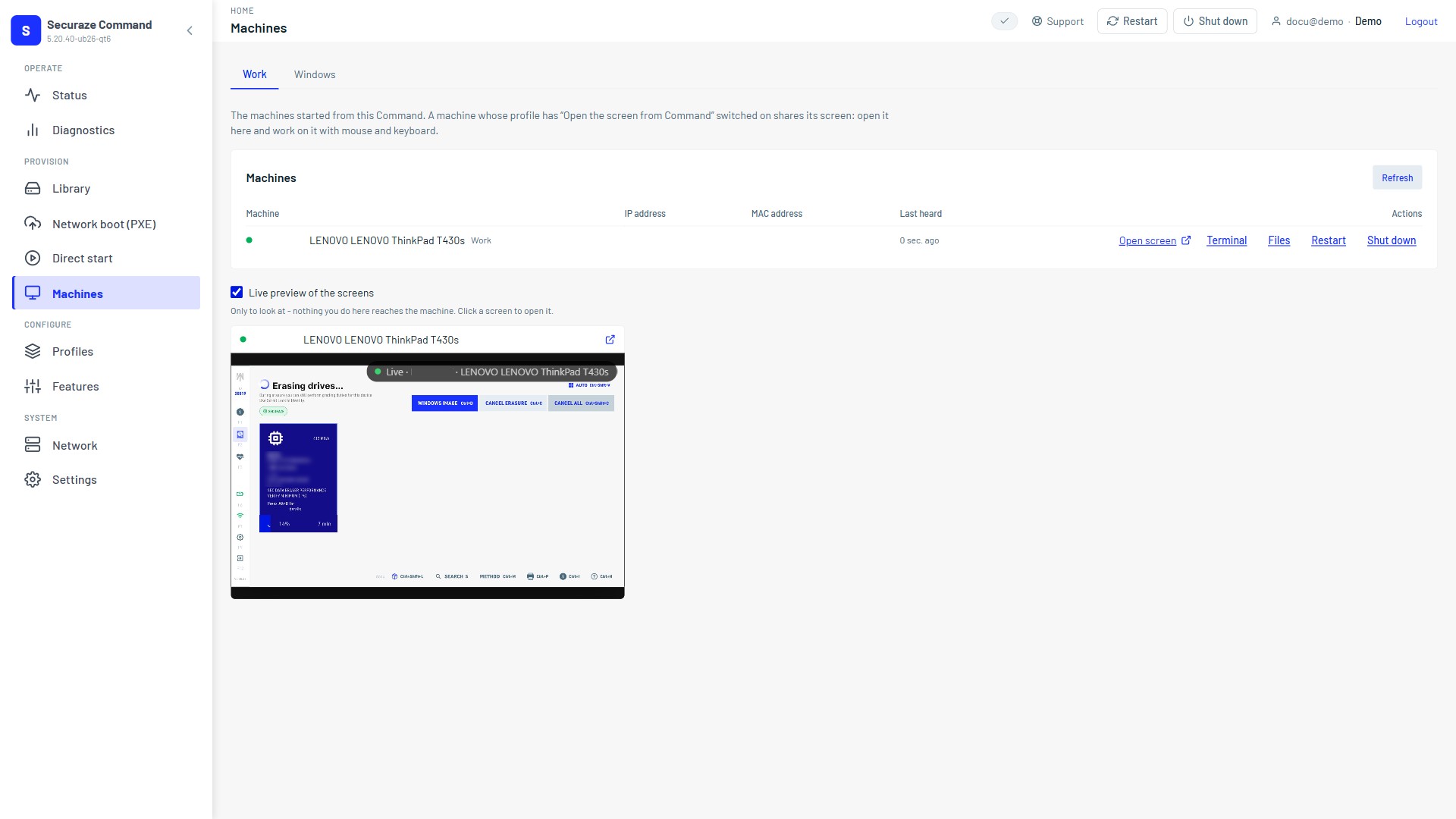
The Machines page shows the screens of every booted machine at once. Open one machine's screen, terminal or files, and restart or shut it down from the browser.
Boot-network health checks
Command spots network loops, a second DHCP server or Command, slow ports and a boot port plugged into the office LAN — before they stop a bench.
Licenses on site
Move licenses onto your Command and hand them to every machine it boots — erasure keeps running when the site is offline.
Chromebook check
Test Chromebooks straight from Command — the result lands in your reports like any Work station.
Firmware and BIOS without internet
Apple firmware for iOS, iPadOS and macOS and the makers' newer BIOS for Lenovo, Dell and HP are served from Command — stations need no internet of their own.
Mac Start via Command
Start Work on Apple silicon and Intel Macs from macOS Recovery, with one command and no USB stick.
Windows reimaging from your Command
Command serves the Windows image, the driver packs for Dell, HP, Lenovo and Surface, and your software — erased machines get a fresh Windows over the network and need no internet of their own. Add your logo and wallpaper, a product key per machine, and let Command learn each model's drivers from the first one it sees.
Zero-touch Station Setup
Profiles over network boot set up each station; machines start in seconds. Profiles carry the whole station setup — erasure standard, server limits, lot assignment — locked behind a password if you want, and exported in one file.
Your account, your labels
Sign in with your Securaze account and switch between customers from the header. Labels print on Zebra, Godex and Brother printers.
Securaze Command 6 — frequently asked questions
What is Securaze Command used for?
Command is the on-premise orchestration server for Securaze processing floors — it PXE-boots clients over the network, manages licenses and settings centrally, and enables fully offline/air-gapped operation.
Do I still need bootable USB sticks with Command?
No. Stations PXE-boot from Command over the network. (For field work, Securaze Creator still builds bootable USB drives with OTA update support.)
Can Command run without internet access?
Yes. Command is designed for offline and air-gapped facilities. Licenses are moved onto Command, and reports from offline runs are kept there for export.
See Securaze Command 6 in action
A live demo on your device mix and a free trial on your own inventory — from the platform ITADs and refurbishers switch to.
PAY ONLY FOR SUCCESSFUL ERASURES · CREDITS NEVER EXPIRE